knacksnews
Unlocking Serial Communication: Free Tools for Debugging
Serial communication has long been essential for data exchange between computers and external devices, including embedded systems and industrial machines. When communication issues arise, debugging becomes critical. Free serial port assistant debugging tools help developers diagnose problems, monitor data traffic, and test device communication without costly hardware or software.
Serial connection debugging manually is tiresome and time-consuming, involving trial and error. Tools make it easier by enabling users to see data packets visually, send test commands, and detect faults in real-time. This article discusses the top free serial port assistant debugging tools, their most important features, and how they make troubleshooting easier, making serial communication efficient and error-free.
Understanding Serial Port Debugging
Serial ports allow communication between a computer and peripheral devices over protocols such as RS-232, RS-485, and UART. Despite advancements in USB and wireless communications, serial ports remain a vital communication tool for most industries because of their reliability and ease of use. Serial connection debugging consists of examining data transfer, testing baud rates, and locating faults.
Serial port debuggers assist in catching, examining, and testing real-time data transfers. They record signals, identify transmission errors, and offer visibility into communication protocols. This is particularly helpful for industrial automation, IoT devices, and microcontrollers. Rather than interpreting raw data manually, debugging software makes it presentable in a structured form, simplifying problem diagnosis.
All free serial port debugging software supports live monitoring, data logging, and command sending. Additional advanced features are scripting and automation to support ongoing testing, streamline debugging, and enhance workflow productivity.
Top Free Serial Port Assistant Debugging Tools
Serial communication debugging can be tedious, but using these free pieces of software becomes very easy by providing real-time monitoring, logging, and testing support. Below are some of the best available free software:
PuTTY

PuTTY is a widely used terminal emulator for serial, SSH, and Telnet connections. Although it's most famously associated with remote access, it's also a very capable serial port debugging tool. Using PuTTY, you can connect directly to serial devices, send bespoke commands, and see responses in real-time. It supports variable baud rates, the selection of COM ports, and raw data display. Its open-source and lightweight nature contribute to its popularity as a developer's first pick when working with industrial hardware and embedded systems.
RealTerm
RealTerm is a feature-rich serial debugging tool designed for handling binary and ASCII data. Unlike standard terminal emulators, RealTerm provides advanced data display options, making it ideal for developers working with raw byte streams. It allows packet capturing, hex mode viewing, and scripting for automated testing. The ability to visualize data in various formats makes it a preferred choice for engineers working with non-text-based communication protocols.
Tera Term
Tera Term is another free and open-source terminal emulator with strong serial debugging capabilities. It offers logging, macro scripting, and support for multiple protocols. Its intuitive interface allows users to monitor and test serial data effortlessly. One of its standout features is the ability to create automated sequences using built-in scripting functions, making it a valuable tool for repetitive testing and diagnostics.
Termite
Termite is a simple yet effective serial communication tool that focuses on ease of use. Unlike other tools that provide excessive technical details, Termite presents data in a clean and readable format. It features automatic line formatting, filtering options, and logging capabilities. While it lacks some of the advanced features of RealTerm, its lightweight nature makes it an excellent choice for basic serial debugging.
Serial Port Monitor (Free Version)
Serial Port Monitor provides an in-depth analysis of serial port activity. The free version includes real-time data tracking, protocol analysis, and communication logging. This tool is particularly useful for developers who need a structured view of serial communication, allowing them to detect errors, analyze timing issues, and optimize data transmission.
How These Tools Simplify Debugging?
Using serial port debugging software eliminates guesswork and speeds up troubleshooting. Instead of relying on basic command-line methods, these tools provide a graphical interface to visualize serial traffic. They allow developers to identify incorrect baud rates, detect missing data packets, and analyze handshaking signals in real-time.
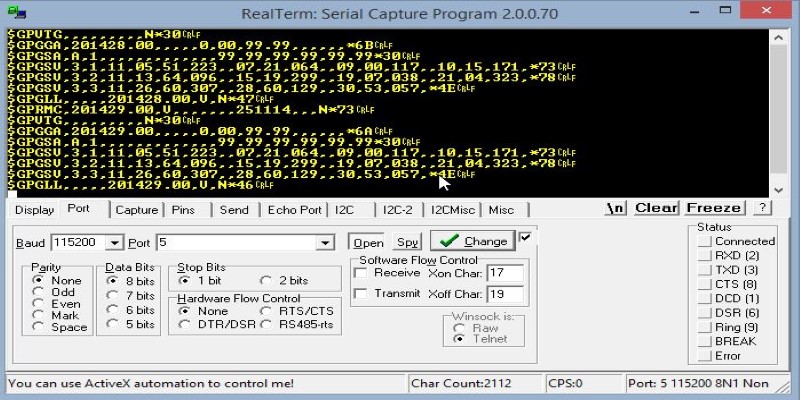
One of the most common serial communication issues is mismatched configurations. When two devices fail to communicate, it’s often due to incorrect settings such as baud rate, parity, or stop bits. Debugging tools help verify these parameters, ensuring both ends of the connection align correctly.
Another advantage is the ability to send test commands manually. When working with embedded devices, you often need to send specific instructions to verify responses. Tools like PuTTY and RealTerm allow direct command input, making it easy to test firmware functions and device behavior.
Data logging is another crucial feature. Many debugging tools let you save communication logs, which can be reviewed later for in-depth analysis. This is especially useful for long-term monitoring, helping developers identify intermittent connection issues that might not appear during short test sessions.
Choosing the Right Tool for Your Needs
The right serial port debugging software depends on the complexity of your project. Lightweight tools like PuTTY and Termite are sufficient for basic testing and communication. If you need advanced features like packet inspection and binary data analysis, RealTerm or Serial Port Monitor might be a better fit.
Consider whether you need automation capabilities. If you're running repetitive tests, a tool with scripting support like Tera Term can save time. Likewise, if you prefer a simple interface without excessive technical details, Termite is a good option.
The availability of these free tools ensures that developers and engineers have the necessary resources for effective debugging without investing in expensive software. While some paid solutions offer additional features like network monitoring and virtual serial ports, most debugging tasks can be accomplished using free alternatives.
Conclusion
Debugging serial communication is easier with the right tools. Free serial port assistant debugging tools like PuTTY, RealTerm, and Tera Term help monitor, test, and analyze data efficiently. Whether you're troubleshooting embedded systems, industrial machines, or IoT devices, these tools offer real-time insights and structured analysis. Choosing the right one depends on your needs, from simple testing to advanced protocol analysis. With these free solutions, developers can quickly identify and resolve serial communication issues, ensuring seamless device interactions.
Related Articles

How to Convert JPG to TIFF on Your Desktop: A Simple Guide

Understanding CMMS: What It Is, Its Uses, and Essential Software Tips

How to Turn an Image into an STL for the Best Stereolithograph in 3D Printing

The Best Dictation Software: Transforming How You Work and Communicate

The 11 Best CRMs for Small Business: Streamline Your Workflow in 2025

From SVG to PNG: The Ultimate Guide for Converting 2D Graphics into Digital Images

How to Add New Google Calendar Events to Notion: A Step-by-Step Guide

Best Image to PDF Converters for Desktop: 6 Top Picks

How to Easily Print Contracts with ezeep Blue: A Complete Guide

How to Personalize and Scale Your SMS Marketing with EZ Texting

How to Convert 4 JPG to BMP: Easily Decode Compressed Images into Uncompressed Files